Vodafone Broadband Down? How to Check, What to Do and When You Can Claim
Quick answer: If your Vodafone broadband has stopped working, check Vodafone’s official Network Status Checker and sign in to My Vodafone for service updates in your area. Downdetector can show whether other users are reporting problems, but it is not official confirmation of an outage. Try restarting your router once, check cables and test whether the issue affects all your devices. If broadband stays down, contact Vodafone support. Compensation may apply under certain conditions through Ofcom’s automatic compensation scheme, but it is not guaranteed for every fault.
Losing your internet connection is frustrating, especially when you need it for work, study or daily life. If you are searching for “Vodafone broadband down” right now, you likely want to know whether the problem is just your home or something bigger. This guide covers how to check, what steps to take, and what your rights are as a UK broadband customer.
Live status note: Outage situations can change quickly. Always check Vodafone’s official tools for the most current information about your area and account.
Is Vodafone broadband down today?
Vodafone broadband may be affected by a wider outage, local maintenance, a fault on your line, a router problem or an issue with your home Wi-Fi. The cause can vary from one customer to another.
On 28 April 2026, Downdetector recorded a spike of around 1,500 user reports about Vodafone broadband, mostly related to fixed-line broadband. Reports peaked shortly after 2pm BST and had largely subsided by the evening, according to UK media reporting. By 29 April, services appeared to have stabilised for most users.
If you are reading this after that date, the situation may have changed. Do not assume Vodafone is still down based on old reports. Check these sources for the latest:
- Vodafone’s official Network Status Checker
- My Vodafone app or account
- Vodafone broadband support pages
- Downdetector for current user-report spikes
How to check if Vodafone broadband is down
Follow these steps in order:
- Check Vodafone’s Network Status Checker. Enter your postcode or area to see if Vodafone is reporting any known issues or planned maintenance near you.
- Sign in to My Vodafone. Your account may show service alerts, fault notifications or maintenance schedules specific to your connection.
- Visit Vodafone’s broadband support pages. These include diagnostic tools and troubleshooting guides for home broadband.
- Look at Downdetector. If you see a spike in user reports, it suggests other people are having problems too, but this is not official confirmation from Vodafone.
- Check Vodafone’s social media accounts or trusted UK news. If a major outage is happening, it is usually covered by outlets such as the BBC, Sky News or The Independent.
- Ask neighbours or nearby Vodafone customers. If they are also affected, the issue is likely local rather than just your equipment.
- Contact Vodafone support. If none of the above explains the problem, get in touch with Vodafone directly.
Vodafone network status checker vs Downdetector
| Tool | What it shows | Best used for | Important warning |
|---|---|---|---|
| Vodafone Network Status Checker | Known faults, maintenance and service updates for your area | Checking official Vodafone service status by postcode | May not reflect very new or developing faults immediately |
| My Vodafone | Account alerts, service notifications and broadband diagnostics | Checking your own connection status and account issues | Requires sign-in to your Vodafone account |
| Vodafone broadband support | Troubleshooting guides and diagnostic tools | Diagnosing home broadband and router problems | General guidance, not a live fault map |
| Downdetector | User-submitted problem reports and spike charts | Spotting whether many users are reporting issues at the same time | Not official confirmation of a Vodafone outage |
| Trusted UK news | Verified reporting on major outages | Understanding scope and context of a confirmed large-scale problem | Not always immediate and may lag behind live events |
| Third-party outage maps | Crowdsourced reports shown on a map | Getting a rough geographic picture of reported issues | Not official Vodafone data and may be unreliable |
Vodafone’s own tools are the best source for information specific to your account and area. Downdetector is useful as a quick signal but should never be treated as official.
Vodafone broadband down in my area
To check whether your area is affected:
- Use Vodafone’s Network Status Checker with your postcode.
- Sign in to My Vodafone for any location-specific alerts.
- Check Downdetector’s live map for clusters of reports near you.
Local issues can include planned maintenance on the network, a fault at your local exchange, damage to street-level cabling, or a problem specific to your building. These will not always appear on Downdetector because they may affect only a small number of homes.
Do not assume your area is fine just because there is no spike on Downdetector. Equally, do not assume your area is affected just because there is a national spike.
Vodafone broadband not working: quick checks
Before contacting support, try these safe checks:
- Check other devices. Can any phone, tablet or laptop connect to Wi-Fi? If only one device fails, the issue may be with that device, not the broadband.
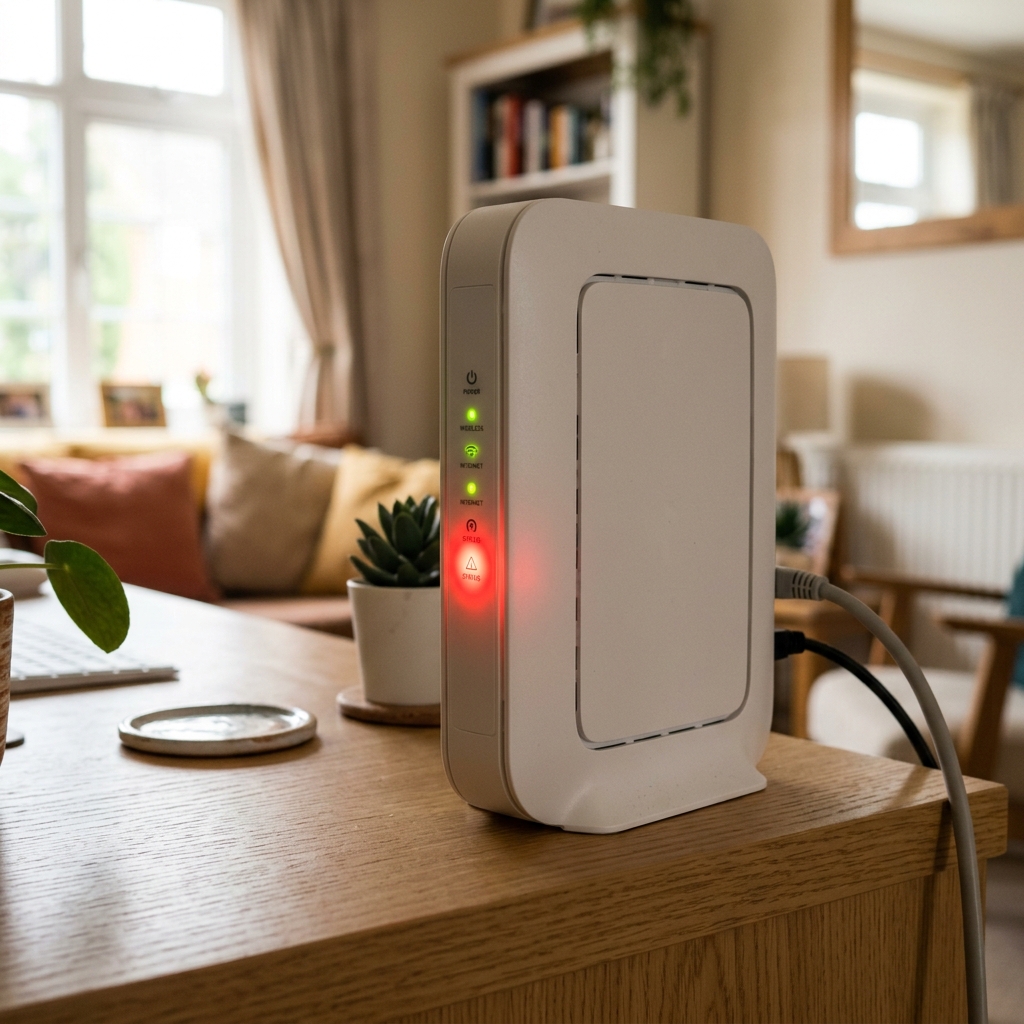
- Check router lights. A steady green broadband light usually means the line is connected. A red or flashing light may indicate a problem. Check Vodafone’s support pages for the meaning of lights on your specific router model.
- Restart the router once. Turn it off, wait 30 seconds, turn it back on. Allow two to three minutes for it to reconnect.
- Check cables and power. Make sure the power lead, phone line cable and any ethernet cables are firmly plugged in and undamaged.
- Check if Wi-Fi is disabled. Some routers have a physical Wi-Fi on/off button. Make sure it is switched on.
- Try a wired connection. If possible, connect a laptop directly to the router with an ethernet cable. If wired internet works but Wi-Fi does not, the issue is wireless, not broadband.
- Check Vodafone’s service status. Use the steps in the section above.
- Check your account. Make sure your bill is up to date and your service has not been suspended.
- Contact Vodafone. If the problem continues after these checks, get in touch with support.
Do not factory reset your router unless Vodafone support specifically tells you to. It wipes your settings and rarely fixes outage-related problems.
Why is Vodafone internet not working?
Common reasons include:
- A wider Vodafone service outage affecting your area
- Planned maintenance on the network
- A fault on the broadband line between your home and the exchange
- A router hardware fault
- Wi-Fi signal problems inside the home
- A problem with a single device
- A damaged or loose cable
- An account, billing or activation issue
- A DNS or service configuration problem
- A power cut or local infrastructure issue
The exact cause cannot be confirmed without checking your service and equipment. The quick checks above will help narrow it down.
Why has my broadband suddenly stopped working?
A sudden loss of broadband can happen for several reasons. The router may have lost its connection to the network. A local fault or maintenance window may have started. The line between your home and the exchange may have dropped. Or Vodafone may be dealing with a wider service issue.
The first thing to check is whether the problem affects all your devices or just one. If every device has lost internet, the issue is likely the broadband connection or router. If only one device is affected, the problem may be with that device’s Wi-Fi, settings or hardware.
Check the router lights, restart the router once, and then look at Vodafone’s official status tools.
Vodafone Wi-Fi down vs Vodafone broadband down
These are two different things, and the difference matters.
Broadband is the internet connection that comes into your home through a phone line or fibre cable. If broadband is down, no device in the house can get online, even with a wired connection.
Wi-Fi is the wireless signal your router sends out inside your home. If Wi-Fi stops working, your broadband line may still be active. You might be able to get online by plugging a laptop into the router with an ethernet cable.
If a wired connection works but Wi-Fi does not, the problem is likely the router’s wireless function, not the broadband service. Try restarting the router or checking whether the Wi-Fi button has been accidentally turned off. If broadband is completely down, the issue is with the line or network, not just Wi-Fi.
Vodafone data not working
Vodafone mobile data problems are separate from home broadband issues. “Vodafone data not working” usually refers to mobile internet on a Vodafone SIM, which uses the mobile phone network rather than a fixed broadband line.
If your mobile data is not working:
- Check your mobile signal strength
- Check Vodafone’s mobile network status for your area
- Make sure you have data allowance remaining
- Turn aeroplane mode on and off
- Check your SIM is properly seated
- Restart your phone
- Check for Vodafone mobile support updates
Unless Vodafone or reliable sources confirm that both broadband and mobile services are affected at the same time, do not assume one problem is linked to the other.
Contact Vodafone broadband
If you need to get in touch with Vodafone about a broadband problem, use these official routes:
- My Vodafone app for account alerts, chat and support
- Vodafone’s digital assistant (TOBi) on the Vodafone website, available 24/7
- Phone: Call 191 from a Vodafone mobile (free) or 0333 304 0191 from any other phone (standard call charges apply)
- Vodafone’s broadband support pages for troubleshooting tools and guides
Phone lines are typically open Monday to Friday 8am to 10pm, and Saturday to Sunday 8am to 8pm. TOBi can connect you to a human adviser if needed.
Be careful with phone numbers you find through search results. Only use numbers confirmed on Vodafone’s official website. Scammers sometimes advertise fake support numbers that charge premium rates or attempt to steal account details.
Can you get compensation if Vodafone broadband is down?
Vodafone is a participant in Ofcom’s automatic compensation scheme for broadband and landline customers. Under this scheme, you may be entitled to compensation in certain situations without having to ask for it.
As of April 2026, the compensation rates are:
| Situation | Compensation | Conditions |
|---|---|---|
| Delayed repair after loss of service | £10.34 per day | Starts after two full working days from when you reported the fault |
| Missed engineer appointment | £32.31 per appointment | If the engineer does not turn up or cancels with less than 24 hours’ notice |
| Delayed start of a new service | £6.46 per calendar day | If activation is later than the agreed start date |
Compensation is usually applied as a credit on your next bill. You must report the fault to Vodafone to start the process.
What does not automatically qualify:
- Short outages that are resolved quickly
- Wi-Fi-only problems inside the home
- Slow speeds (this is a separate issue)
- Planned maintenance
- Problems caused by your own equipment or actions
- Situations where you prevented an engineer from completing a repair
If you think you are owed compensation and it has not been applied, contact Vodafone. If your complaint is not resolved, you can escalate it to an Ofcom-approved Alternative Dispute Resolution scheme.
What should you keep if your broadband is down?
If the fault lasts or you need to contact support, keep a record of:
- Date and time the problem started
- Screenshots of any error messages or status pages
- A photo of your router lights if they show a fault
- Your fault reference number from Vodafone
- Chat transcripts or call records with support
- Speed test results if the service is slow rather than completely down
- Details of any engineer appointments
- The date and time service was restored
- Notes about any work-from-home or urgent impact
These records can help if you need to chase a repair, discuss compensation or escalate a complaint.
What has not been confirmed?
Keep these points in mind:
- Vodafone is not always down just because one home has lost internet. The issue may be local or device-specific.
- Downdetector reports are user-submitted and do not prove an official Vodafone outage.
- A Wi-Fi problem inside your home is not always a broadband outage.
- Mobile data problems are not always linked to home broadband faults.
- Compensation is not guaranteed for every fault or every customer.
- A national outage should not be assumed unless Vodafone or multiple reliable sources confirm it.
- Do not assume hacking or a cyberattack is the cause unless Vodafone or authorities officially confirm it.
Key background
A broadband outage means the internet service coming into your home has stopped working. It can affect one home, one street, one area or a larger region, depending on the cause.
A local fault could be a damaged cable, an exchange problem or an issue with the infrastructure serving your street. These are fixed by the network operator.
A router issue means the equipment in your home is not working properly. It may need restarting, reconfiguring or replacing.
A Wi-Fi issue means the wireless signal is not reaching your devices, even though the broadband line may still be active.
Downdetector is a third-party website that collects user reports about service problems. It is useful for spotting trends but does not have access to Vodafone’s internal systems.
The Vodafone Network Status Checker is Vodafone’s official tool for checking known faults, maintenance and service updates in a selected area.
A support ticket or fault reference is the record created when you report a problem to Vodafone. Keep this number for follow-up.
The Ofcom automatic compensation scheme is a voluntary scheme that participating broadband providers, including Vodafone, have signed up to. It sets rules for compensating customers when certain things go wrong.
Simple troubleshooting checklist
| Step | What to do | Why it helps |
|---|---|---|
| 1 | Check if other devices can connect | Rules out a single device fault |
| 2 | Check router lights | Red or flashing lights can indicate a line or equipment fault |
| 3 | Restart the router once | Clears temporary glitches without changing settings |
| 4 | Check all cables | A loose or damaged cable can break the connection |
| 5 | Test a wired connection | Confirms whether broadband or Wi-Fi is the problem |
| 6 | Check Vodafone’s status tools | Shows known faults or maintenance in your area |
| 7 | Check Downdetector | Indicates whether other users are also reporting issues |
| 8 | Contact Vodafone support | Gets your fault logged and starts the resolution process |
Common mistakes
Mistake: “Downdetector proves Vodafone has confirmed an outage.” Reality: Downdetector collects user reports. It does not have access to Vodafone’s network systems. A spike in reports suggests a problem, but Vodafone’s official tools are the only way to confirm a recognised fault.
Mistake: “Wi-Fi down always means broadband is down.” Reality: Wi-Fi is the wireless signal inside your home. Broadband is the internet connection from outside. If Wi-Fi fails but a wired connection works, the broadband line is fine and the issue is with the router’s wireless function.
Mistake: “Mobile data not working is the same as home broadband down.” Reality: Home broadband uses a fixed line. Mobile data uses the phone network. They are separate systems. One can be down while the other works normally.
Mistake: “Everyone gets compensation for any outage.” Reality: Ofcom’s scheme covers specific situations: delayed repairs after two working days, missed appointments and delayed activation. Short outages, Wi-Fi problems and issues caused by your own equipment are not automatically covered.
Mistake: “A factory reset is the first thing to try.” Reality: A factory reset wipes all your router settings. It should only be done if Vodafone support advises it. A simple restart is the safe first step.
What happens next?
If your broadband is currently down, here is what to watch for:
- Vodafone status updates on the Network Status Checker and My Vodafone
- Fault reference updates from Vodafone support if you have reported the issue
- Router light changes that may indicate the connection is coming back
- Engineer appointment times if a visit has been arranged
- Compensation eligibility if the fault lasts beyond two full working days after you reported it
- Trusted news updates if a major outage has been confirmed by multiple sources
- Service restoration so you can note the time for your records
Do not rely on estimated restoration times from unofficial sources. Only trust times confirmed by Vodafone or your fault reference updates.
People Also Ask
Is Vodafone wifi down today?
It may be, but a Wi-Fi problem can also be local to your home rather than a wider Vodafone issue. Check Vodafone’s official Network Status Checker and your router lights first. If other devices in your home can connect or a wired connection works, the problem is likely your Wi-Fi setup, not Vodafone’s network.
How to check if Vodafone broadband is down?
Use Vodafone’s official Network Status Checker by entering your postcode. Sign in to My Vodafone for account-specific alerts. Check Vodafone’s broadband support pages for diagnostic tools. You can also look at Downdetector for user-report spikes, but remember this is not official confirmation of a fault.
Why is Vodafone internet not working?
Common reasons include a wider Vodafone outage, local maintenance, a router fault, a Wi-Fi signal problem, a damaged cable, a line fault or an account issue. Follow the basic checks in this guide and contact Vodafone support if the problem continues after restarting your router and checking the service status.
Why has my broadband suddenly stopped working?
Sudden broadband failures can come from local line faults, unplanned maintenance, a router disconnection, a damaged cable or a wider provider outage. Check whether all devices in your home are affected. If every device has lost internet, the problem is likely the broadband connection rather than a single device. Check Vodafone’s status tools and restart your router once.
People Also Search For
Vodafone broadband down in my area
Use Vodafone’s Network Status Checker with your postcode to see if there are known faults or planned maintenance near you. My Vodafone may also show location-specific service alerts.
Vodafone network status checker
This is Vodafone’s official tool for checking signal, service updates and known network issues in your area. It is the best first step when you suspect a broadband problem.
Vodafone outage map
Vodafone’s own tools provide area-specific status checks rather than a traditional outage map. Third-party outage maps, such as those on Downdetector, show crowdsourced user reports and can give a rough picture, but they are not official Vodafone data.
Vodafone broadband not working
Start by checking other devices, looking at the router lights, restarting the router once and checking cables. If these steps do not help, check Vodafone’s service status and contact support.
Contact Vodafone broadband
Use the My Vodafone app, the TOBi digital assistant on the Vodafone website, or call 191 from a Vodafone mobile (free) or 0333 304 0191 from another phone. Only use numbers confirmed on Vodafone’s official website.
Vodafone broadband contact number
Call 191 from a Vodafone mobile or 0333 304 0191 from any other UK phone. Always verify the number on Vodafone’s official contact page, as numbers can change and unofficial sources may list scam or premium-rate numbers.
Vodafone down Detector
Downdetector is a third-party website that shows user-submitted reports about Vodafone service problems. It can highlight spikes in reported issues, but it is not operated by Vodafone and does not confirm an official outage.
Vodafone data not working
Mobile data issues are separate from home broadband. Check your mobile signal, data allowance, aeroplane mode and SIM. Use Vodafone’s mobile network status tools. Do not assume a mobile data problem is connected to a broadband outage unless confirmed by Vodafone.
Vodafone broadband outage
A broadband outage means the fixed-line internet service has stopped working. It can range from a single home to a wider area. Check Vodafone’s official status tools to see if a known outage is affecting your connection.
Vodafone internet down
To confirm whether your internet is down because of a Vodafone issue rather than a local or device problem, test multiple devices, try a wired connection and check Vodafone’s Network Status Checker. If the checker shows no issues, the problem may be inside your home.
Vodafone Wi-Fi not working
Wi-Fi problems are not always broadband problems. If your broadband line is active but Wi-Fi is not working, try restarting the router, checking the Wi-Fi button and moving closer to the router. A wired connection test can confirm whether the broadband itself is fine.
Vodafone router red light
A red light on your Vodafone router usually indicates a connection or equipment issue. The exact meaning depends on your router model. Check Vodafone’s support pages for a guide to the lights on your specific router. Do not open or tamper with the router hardware.
Vodafone compensation broadband outage
Vodafone participates in Ofcom’s automatic compensation scheme. You may be eligible for £10.34 per day if a repair takes longer than two working days after you report a fault, £32.31 for a missed engineer appointment, or £6.46 per day for a delayed new service activation. Report faults to Vodafone to start the process.
Ofcom broadband compensation
Ofcom’s automatic compensation scheme applies to participating broadband and landline providers, including Vodafone. It covers delayed repairs, missed appointments and delayed activation. Compensation is applied as a bill credit without you having to claim, but you must report the fault. Not all situations qualify, and short outages or Wi-Fi issues are not covered.
Bottom line
If your Vodafone broadband is not working, check Vodafone’s official Network Status Checker and My Vodafone first. Use Downdetector only as a signal of user-reported problems, not as official confirmation.
Separate the issue into broadband, Wi-Fi and mobile data, because each has different causes and solutions. Try safe basic checks: restart the router once, check cables, test other devices and try a wired connection. Do not factory reset without support guidance.
Contact Vodafone through official channels if the problem continues. Keep records of when the fault started, your fault reference number, and any support interactions.
If the fault lasts longer than two full working days after you report it, you may be eligible for compensation under Ofcom’s automatic compensation scheme. Compensation is not guaranteed for every short outage or every Wi-Fi problem. Check Vodafone’s automatic compensation guidance and Ofcom’s scheme rules for your specific situation.
This is general information about broadband outages and consumer rights, not a technical diagnosis of your individual connection.
Sources checked
- Official source: Vodafone Network Status Checker for checking signal, service updates and network issues by area.
- Official source: Vodafone home broadband support pages for diagnostics and troubleshooting.
- Official source: Vodafone My Vodafone account and support channels for account alerts and fault reporting.
- Official source: Vodafone automatic compensation for home broadband guidance.
- Official source: Vodafone contact page confirming support numbers (191 and 0333 304 0191) and TOBi digital assistant.
- Official source: Ofcom automatic compensation guidance for broadband and landline customers, including updated rates from 1 April 2026.
- User-reporting source: Downdetector Vodafone UK page for user-submitted problem reports.
- Trusted reporting: IBTimes, Daily Star and Express coverage of Vodafone broadband outage reports on 28 April 2026.
Frequently Asked Questions
A single restart is a reasonable first step. Turn the router off, wait 30 seconds, then turn it back on. Give it a few minutes to reconnect. If broadband does not come back, check Vodafone's official status tools before restarting again. Repeated restarting is unlikely to help if there is a wider issue.
A factory reset should not be a first step. It wipes your settings, including your Wi-Fi name and password. Only factory reset if Vodafone support specifically advises it. Try simpler checks first, such as restarting the router, checking cables and checking Vodafone's service status.
There is no fixed answer. Some issues are resolved within an hour. Others, especially those involving line faults or infrastructure work, can take longer. Check Vodafone's status tools and support pages for updates on your specific area. Do not rely on estimated times from unofficial sources.
If your Vodafone mobile service is working, you can use mobile data as a backup. Check your data allowance first. If both broadband and mobile data are down, the issue may be more widespread. You could also try connecting through a different mobile network if you have access to one.
The Ofcom automatic compensation scheme covers loss of service, missed appointments and delayed activation. Slow broadband does not automatically qualify. If your speed is consistently below the minimum guaranteed speed in your contract, contact Vodafone to discuss options. Vodafone may offer other remedies depending on the circumstances.
Yes. Downdetector shows user reports, not official fault records. Reporting the issue to Vodafone creates a fault reference on your account, which is needed if you later want to discuss compensation or track the repair. Always report through official Vodafone channels.
Related Posts
 trending
 Nigel Bates EastEnders: Who He Is and What Happened
Nigel Bates is an EastEnders character played by Paul Bradley. Here's his full story, from Phil Mitchell to dementia and his final scenes.
Read More trending
 Whitbread Restaurants: Beefeater, Brewers Fayre and Job Cuts Explained
Whitbread is closing or converting its remaining Beefeater and Brewers Fayre restaurants in a new hotel-focused strategy, putting 3,800 jobs at risk.
Read More trending
 Asda Named Cheapest Supermarket for Branded Goods
Which? says Asda's 241-item branded basket cost £813.16 in March 2026, beating Tesco Clubcard and Sainsbury's Nectar prices.
Read More